EXTRA 10% OFF BITDEFENDER - USE CODE BIT10 AT CHECKOUT

- Laptops
- Desktops & PCs
- PC Components
- Monitors
- Networking
- Printers & Ink
- Storage
- Computer Accessories
- Cables & Adapters
- Power & UPS
- Phones & Tablets
- Phones, Video & Audio
- Software & Security
- Gaming
- Smart Home & Security
- Office Supplies




Laptops
View all (276)





PC Components
View all (421)


Networking
View all (523)


Storage
View all (272)

Computer Accessories
View all (392)
Cables & Adapters
View all (850)
Power & UPS
View all (400)


Phones & Tablets
View all (50)Top Categories
VoIP & IP Phones Video Conferencing
 Headphones & Headsets
 Headphones, Speakers & Audio
Phones, Video & Audio
View all (216)Top Categories
Microsoft Office Applications, Home and Business Software Antivirus & Security
 NORTON
 Bitdefender
Software & Security
View all (64)
Gaming
View all (194)
Smart Home & Security
View all (46)Office Supplies
View all (136)Browse all 136 products in Office Supplies.
Bitdefender Premium Security - Individual or Family
i
RRP is the brand's recommended retail price. The saving is the difference between the RRP and our current price.
- AI-powered protection against viruses, ransomware and other malware
- AI-powered Scam Protection that looks for scams in messages, links and websites
- Unlimited VPN traffic, with servers in more than 100 countries (1 account Individual, 5 accounts Family)
- Password manager (1 account Individual, 5 accounts Family)
- Email Protection that marks incoming Gmail and Outlook web mail as safe or unsafe
Details
Bitdefender Premium Security combines full device protection with unlimited VPN traffic and AI-powered Scam Protection, for Windows PCs, Macs, Android and iOS devices. It suits people who shop, bank and browse on public Wi-Fi and want their privacy covered as well as their devices.
Choose Individual (one person, up to 5 devices) or Family (up to 25 devices and 5 accounts, with parental control), for 1 or 2 years.
Key features
- AI-powered protection against viruses, ransomware and other malware
- AI-powered Scam Protection that looks for scams in messages, links and websites
- Unlimited VPN traffic, with servers in more than 100 countries (1 account Individual, 5 accounts Family)
- Password manager (1 account Individual, 5 accounts Family)
- Email Protection that marks incoming Gmail and Outlook web mail as safe or unsafe
- Anti-intrusion firewall, webcam and microphone protection
- Device optimisation and cryptomining protection
- Family plan: parental control, family dashboard, roles and alerts
Which plan is right for me?
- Individual: one Bitdefender account for one person, with up to 5 devices.
- Family: up to 25 devices and up to 5 accounts, so each family member manages their own devices, with roles, a family dashboard and alerts. Parental control is included for the children's devices.
Compare the Bitdefender range
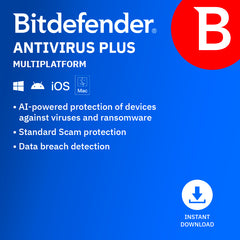
- Antivirus Plus Multiplatform: 1, 3 or 5 devices; antivirus, ransomware protection, data breach detection, VPN with 200 MB per device per day.
- Total Security Standard: 3 devices; adds a firewall, webcam and microphone protection, device optimisation and parental control.
- Total Security: Individual (5 devices) or Family (25 devices); adds a password manager.
- Premium Security: Individual or Family; adds unlimited VPN traffic and AI-powered Scam Protection.
- Ultimate Security: Individual or Family; adds Digital Identity Protection.
Specifications
| Brand | Bitdefender |
| Licence type | Electronic licence key (ESD), no disc or box |
| Plan | Individual - 5 devices, Family - 25 devices |
| Duration | 1 year, 2 years |
| Windows | Windows 11, Windows 10, Windows 8.1 or Windows 7 SP1; 2 GB RAM; 2.5 GB free disk space |
| macOS | macOS Big Sur (11.3) or later; 1 GB free disk space (VPN needs macOS 10.12 or later) |
| Android | Android 7.0 or later |
| iOS | iOS 15 or later (iPhone and iPad) |
FAQs
How do I activate it?
Sign in to Bitdefender Central (or create a free Bitdefender account), open My Subscriptions, choose Activate with code and enter your licence key. Then install Bitdefender on each device from Bitdefender Central with the same account.
Does it work on a Mac, iPhone or Android phone?
Yes. The devices can be any mix of Windows, macOS, Android and iOS. Not every feature is available on every platform.
What is the difference from Ultimate Security?
Ultimate Security has everything in Premium Security plus Digital Identity Protection, which alerts you when your personal information appears in a data breach.
Can I add this to my current Bitdefender subscription?
If the key is for the same product and plan as a subscription already in your Bitdefender account, Bitdefender Central offers to extend it and adds the new time (up to 5 years in total). Otherwise the key starts a separate subscription in your account.
Will Bitdefender charge me automatically later?
When you activate, Bitdefender may ask for billing details to set up automatic renewal. That is an arrangement between you and Bitdefender, managed in your Bitdefender account; Bitdefender does not charge you when you activate the key.
Can I move it to a new device?
Yes. In Bitdefender Central, open My Devices and remove the old device to free its place, then install Bitdefender on the new device with the same account.
What happens when the subscription ends?
Protection stops when the subscription ends unless it is renewed. To continue, buy a new key and activate it in the same Bitdefender account; activated before the end date, it can extend your current subscription.
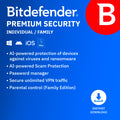 Bitdefender Premium Security - Individual or Family
$ 124.95 AUD