EXTRA 10% OFF BITDEFENDER - USE CODE BIT10 AT CHECKOUT

- Laptops
- Desktops & PCs
- PC Components
- Monitors
- Networking
- Printers & Ink
- Storage
- Computer Accessories
- Cables & Adapters
- Power & UPS
- Phones & Tablets
- Phones, Video & Audio
- Software & Security
- Gaming
- Smart Home & Security
- Office Supplies




Laptops
View all (276)



PC Components
View all (421)


Networking
View all (523)


Storage
View all (272)

Computer Accessories
View all (392)

Cables & Adapters
View all (850)
Power & UPS
View all (400)


Phones & Tablets
View all (50)Top Categories
VoIP & IP Phones Video Conferencing
 Headphones & Headsets
 Headphones, Speakers & Audio
Phones, Video & Audio
View all (216)Top Categories
Microsoft Office Applications, Home and Business Software Antivirus & Security
 NORTON
 Bitdefender

Software & Security
View all (64)
Gaming
View all (194)
Smart Home & Security
View all (46)Office Supplies
View all (136)Browse all 136 products in Office Supplies.
TP-Link VIGI C440-W 4MP Full-Colour Wi-Fi Turret Network Camera 4mm (VIGI C440-W(4mm))
i
RRP is the brand's recommended retail price. The saving is the difference between the RRP and our current price.
Details
TP-Link
TP-Link VIGI C440-W 4MP Full-Colour Wi-Fi Turret Network Camera 4mm (VIGI C440-W(4mm))
The TP-Link VIGI C440-W is a 4MP turret camera that joins your network over Wi-Fi for a quick, simple setup. A high-sensitivity sensor and included spotlight LEDs deliver 24-hour colour detail, even in pitch-black conditions.
Smart detection covers motion, area intrusion, line crossing and video tampering, with notifications sent when something happens. H.265+ smart coding saves disk space and eases network load, and the VIGI app lets you monitor and manage the camera remotely.
4MP ultra-high definition
Plenty of detail for entrances and interiors.
Wireless connection
Wi-Fi for fast deployment.
24h full-colour
Sensitive sensor with spotlight LEDs.
Smart detection
Motion, area intrusion, line crossing and tampering alerts.
H.265+ smart coding
Saves disk space and network load.
Remote monitoring
Manage the camera from the VIGI app.
Ideal for
Homes and small businesses wanting a simple wireless turret camera for entrances and indoor spaces.
Specifications
| Camera | |
|---|---|
| Resolution | 4MP |
| Lens | 4mm |
| Form | Turret |
| Night vision | Full-colour with spotlight LEDs |
| Compression | H.265+ |
| Connectivity and management | |
| Network | Wi-Fi |
| Management | VIGI app |
| Smart detection | Motion, area intrusion, line crossing, video tampering |
| General | |
| Manufacturer part number | VIGI C440-W(4mm) |
| Warranty | 3-year TP-Link limited warranty |
| In the box | |
| Contents | TP-Link VIGI C440-W(4mm) camera |
| Warranty | |
| Warranty | 3-year TP-Link limited warranty |
FAQs
Does it use Wi-Fi?
Yes, it connects wirelessly over Wi-Fi.
Does it have night vision?
Yes. Spotlight LEDs and a sensitive sensor provide 24-hour full-colour video.
How do I view it remotely?
Use the VIGI app.
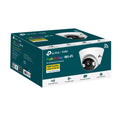 TP-Link VIGI C440-W 4MP Full-Colour Wi-Fi Turret Network Camera 4mm (VIGI C440-W(4mm))
$ 122.95 AUD