EXTRA 10% OFF BITDEFENDER - USE CODE BIT10 AT CHECKOUT

- Laptops
- Desktops & PCs
- PC Components
- Monitors
- Networking
- Printers & Ink
- Storage
- Computer Accessories
- Cables & Adapters
- Power & UPS
- Phones & Tablets
- Phones, Video & Audio
- Software & Security
- Gaming
- Smart Home & Security
- Office Supplies




Laptops
View all (276)





PC Components
View all (421)


Networking
View all (523)


Storage
View all (272)


Computer Accessories
View all (392)

Cables & Adapters
View all (850)

Power & UPS
View all (400)



Phones & Tablets
View all (50)Top Categories
VoIP & IP Phones Video Conferencing
 Headphones & Headsets
 Headphones, Speakers & Audio
Phones, Video & Audio
View all (216)Top Categories
Microsoft Office Applications, Home and Business Software Antivirus & Security
 NORTON
 Bitdefender

Software & Security
View all (64)
Gaming
View all (194)
Smart Home & Security
View all (46)Office Supplies
View all (136)Browse all 136 products in Office Supplies.
Mercusys MB135-4G AC1200 Wireless Dual-Band 4G LTE Router, 4 Antennas (MB135-4G)
i
RRP is the brand's recommended retail price. The saving is the difference between the RRP and our current price.
Details
Networking
Plug in a SIM card and get Wi-Fi anywhere with coverage
The Mercusys MB135-4G is an AC1200 dual-band 4G LTE router with downloads of up to 150Mbps, sharing its connection with up to 64 Wi-Fi devices.

Wi-Fi reaches 300Mbps on 2.4GHz and 867Mbps on 5GHz, and four external antennas keep connections stable and efficient. If a 4G signal isn't available, plug an Ethernet cable into the LAN/WAN port and it works as a standard Wi-Fi router.
Highlights
Key features
4G LTE
Download speeds up to 150Mbps.
AC1200 dual-band Wi-Fi
300Mbps on 2.4GHz and 867Mbps on 5GHz.
64 devices
Share internet access with up to 64 Wi-Fi devices.
Four external antennas
Stable, efficient connections to every device.
Wi-Fi router mode
Use the LAN/WAN port with an Ethernet connection when 4G is unavailable.
The specs that matter
What these specs mean for you
Wi-Fi: AC1200 dual-band: 867Mbps (5GHz), 300Mbps (2.4GHz)
Newer Wi-Fi standards (Wi-Fi 6, 6E and 7) handle more devices at once with faster, steadier speeds, and still work with older devices.
Ideal for
Households, holiday homes and small businesses needing mobile or backup internet.
Specifications
| Wireless | |
|---|---|
| Wi-Fi | AC1200 dual-band: 867Mbps (5GHz), 300Mbps (2.4GHz) |
| Devices | Up to 64 |
| Antennas | 4 × external |
| Mobile | |
| 4G | LTE, download up to 150Mbps |
| SIM | SIM card slot, plug and play |
| Connectivity | |
| Port | LAN/WAN Ethernet port |
| General | |
| Manufacturer part number | MB135-4G |
| Warranty | 2-year Mercusys limited warranty |
| In the box | |
| Contents | Mercusys MB135-4G router |
| Warranty | |
| Warranty | 2-year Mercusys limited warranty |
FAQs
Do I need to configure it?
No. Insert a SIM card and the router is ready, with no configuration needed.
Can it work without a 4G signal?
Yes. Connect an Ethernet cable to the LAN/WAN port to use it as a Wi-Fi router.
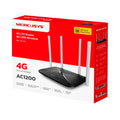 Mercusys MB135-4G AC1200 Wireless Dual-Band 4G LTE Router, 4 Antennas (MB135-4G)
$ 133.95 AUD