EXTRA 10% OFF BITDEFENDER - USE CODE BIT10 AT CHECKOUT

- Laptops
- Desktops & PCs
- PC Components
- Monitors
- Networking
- Printers & Ink
- Storage
- Computer Accessories
- Cables & Adapters
- Power & UPS
- Phones & Tablets
- Phones, Video & Audio
- Software & Security
- Gaming
- Smart Home & Security
- Office Supplies




Laptops
View all (276)





PC Components
View all (421)

Networking
View all (523)


Storage
View all (272)

Computer Accessories
View all (392)

Cables & Adapters
View all (850)
Power & UPS
View all (400)


Phones & Tablets
View all (50)Top Categories
VoIP & IP Phones Video Conferencing
 Headphones & Headsets
 Headphones, Speakers & Audio
Phones, Video & Audio
View all (216)Top Categories
Microsoft Office Applications, Home and Business Software Antivirus & Security
 NORTON
 Bitdefender

Software & Security
View all (64)
Gaming
View all (194)
Smart Home & Security
View all (46)Office Supplies
View all (136)Browse all 136 products in Office Supplies.
Incase Designed by Microsoft Bluetooth Keyboard Black (QSZ-00017)
i
RRP is the brand's recommended retail price. The saving is the difference between the RRP and our current price.
Details
Incase
Incase Designed by Microsoft Bluetooth Keyboard Black
Go wireless with a slim keyboard that pairs in seconds. The Incase Designed by Microsoft Bluetooth Keyboard connects to your Windows laptop over Bluetooth and uses Swift Pair for quick setup on Windows 11 and Windows 10.
Built-in shortcut keys put Office 365, search, expressive keys, media controls, screen snipping, the calculator and volume at your fingertips, and the battery lasts up to three years. It comes in a black finish, ideal for travel or desk use.
Bluetooth connection
Wireless freedom, with Bluetooth 4.0 or higher required.
Swift Pair
Pairs with Windows 11 and Windows 10 PCs right out of the box.
Time-saving shortcuts
Dedicated Office 365, search, media, screen snipping, calculator and volume keys.
Up to three-year battery life
Less time spent swapping batteries.
Slim black design
PC+ABS construction at 0.8 in (about 2 cm) thick.
Ideal for
Windows laptop users, students and hybrid workers who want a tidy wireless keyboard with handy shortcut keys.
Specifications
| Connectivity | |
|---|---|
| Connection | Wireless, Bluetooth 4.0 or higher required |
| Quick pairing | Swift Pair (Windows 11/10) |
| Compatibility | |
| Operating systems | Windows 11, Windows 10; macOS 15, macOS 10.15, iPadOS 18, iOS 18 (some functions limited) |
| Software | Not compatible with Microsoft Mouse and Keyboard Center or Microsoft Accessory Center |
| Physical | |
| Colour | Black |
| Dimensions | 17.1 × 4.9 × 0.8 in (about 43.4 × 12.4 × 2.0 cm) |
| Materials | PC+ABS |
| Battery life | Up to 3 years |
| General | |
| Manufacturer part number | QSZ-00017 |
| In the box | |
| Contents | Incase Designed by Microsoft Bluetooth Keyboard (Black) |
FAQs
Does it work with a Mac or iPad?
It supports macOS 15, macOS 10.15, iPadOS 18 and iOS 18, but some functions are limited on those systems.
How does it connect?
Over Bluetooth, which requires Bluetooth 4.0 or higher. On Windows 11 and 10 it pairs quickly using Swift Pair.
Can I use Microsoft Mouse and Keyboard Center with it?
No. This keyboard is not compatible with Microsoft Mouse and Keyboard Center or Microsoft Accessory Center.
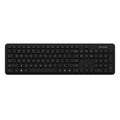 Incase Designed by Microsoft Bluetooth Keyboard Black (QSZ-00017)
$ 74.95 AUD